CRM · Content · AI · Client portal

Your whole agency. One HUB.

One workflow. Your workspace.

Silent product tour with real screen recordings from the PPY workspace and animated captions.

It starts with your brand. Brand kit, guidelines and client context. Right where your team works.

One idea. Your own look. Explore and refine visual ideas. Inside your workspace.

From first idea to final approval. Plan, review and publish. One board connects the workflow.

Your client gives the go-ahead. Review posts, leave feedback and approve inside the client portal.

One post. Three channels. Instagram, Facebook and LinkedIn. This is the actual publication.

Your work. Visible to clients. Post performance and analytics. In their portal, under your brand.

Every enquiry. One shared place. Client communication across channels. With replies and internal notes.

Every contact. A clear next step. Capture, score and follow up on leads. With the whole funnel in view.

Know where you stand. Analyse AI visibility and your website. With the results inside your HUB.

The problem

One agency. Too many disconnected subscriptions.

Content & social

Planning in one tool, approvals in email, publishing in another. The context gets lost in between.

AI creative

Video, image, design and upscaling: separate subscriptions, separate workflows and the same brand briefing repeated again.

CRM & leads

HubSpot, Pipedrive, Apollo for sourcing. Client data lives apart from the work you do for them.

Operations

Toggl for hours, Asana for tasks, Zendesk for tickets, Slack for chat, Drive for files.

Client experience

Approvals in email threads. Status calls. “Can you resend the final version?”

Fewer tool switches.

One shared workspace connects the context with the work that follows.

The answer

Every workflow. One login. One platform.

The day starts and ends in the Agency HUB: leads become clients, briefs become AI-drafted posts, posts get approved in the portal and publish themselves, and every hour is reported per client.

  • One record per client. Briefs, brand kit, budget, contacts and portal access, used by every module.
  • Your data, your instance. Each customer runs isolated: own database, own domain, own branding.
  • Your name on the connection. Bring your own Meta app and your clients see your agency in the Facebook consent dialog, not ours.
  • Continuous updates. New AI models land for every customer at once, no migration on your side.
Your workspace
PPY Workspace
Your workspace

Ideas, approvals and published work. A shared overview for your team.

The platform

21 modules. Use what your pack includes and book the rest à la carte.

Modules switch on per plan. Every tenant runs its own isolated stack with its own database and domain.

Agency day clients, content, communication, hours

STARTER+
CRM & Clients

Briefs, brand kits, budgets, contacts and portal access, one record per client.

STARTER+
Content boards & planner

Idea to published on one board, every client in one calendar, publishing to Instagram, Facebook, LinkedIn, TikTok and YouTube.

STARTER+
Calendar & Meetings

Team calendar synced with Outlook and Google, plus a content calendar on the post board.

STARTER+
Email

Every thread with a client on their record, with shared templates and signatures.

STARTER+
Messages

Realtime team chat and per-client groups, no Slack sprawl.

STARTER+
Time & attendance

Check in and out, start a timer on a card, flexitime and approvals, hours per client.

STARTER+
Documents

Files per client with Drive, Dropbox and OneDrive import, e-signature on contracts.

STARTER+
Projects & Tasks

Boards, tasks, checklists and assignee progress at a glance.

STARTER+
Team

Absences and vacation at a glance, with roles and permissions in the admin.

PRO+
Kommunikations HUB

One inbox for WhatsApp, Messenger, Instagram and email, with AI reply drafts.

PRO+
Kai, your AI assistant

Explains the HUB, finds things, summarises inbox threads and drafts tasks and posts you confirm.

ENTERPRISE
Finance

Quotes, invoices and e-invoices, AI-read receipts, bank feed and the handoff to your accountant.

Create & produce on-brand, from brief to cut

PRO+
Creative Kit & brand looks

A short brief becomes a whole series of carousels and stories, printed in the client's fonts, colours and logo.

PRO+
Image Lab

Prompt-to-image with references and brand kits, refine by instruction, upscaling.

PRO+
Video Studio

AI clips, script-first storyboards and story films with voice-over and captions; dub or caption an existing cut.

ENTERPRISE
Production

Strategy, shoot plan with client approval, the AI cut from your footage and the feature film.

Optional module, switched on per agency

Grow & measure results, campaigns, new clients

PRO+
Insights & reporting

Social, YouTube and website (GA4) results per client, with reports and AI briefings.

PRO+
Ads Hub & Ad Watcher

Competitors' new Meta ads daily with an AI review of each, your Meta campaigns and Google Ads reporting in one place.

ENTERPRISE
WhatsApp campaigns

Opt-ins, approved templates, broadcasts with a budget stop, and flows that answer on their own.

ENTERPRISE
Lead Generation

Source companies, enrich and AI-score them, run outreach, convert to clients.

ENTERPRISE
AEO Analyzer

How ChatGPT, Gemini and Perplexity describe your clients versus competitors.

STARTER+ included from Starter PRO+ included from Professional ENTERPRISE Enterprise, or as an extra from €29 / month
Content engine · the board

One kanban runs the whole content operation.

Idea→Draft→Review→Approved→Scheduled→Published

Clients drop ideas straight into the board, one drag and the AI writes the drafts, approvals happen in-flow, and the Published column is the receipt.

  • AI generate and regenerate. Caption, image and reel per client brand voice.
  • Per-platform content. A separate variant per network — Instagram, Facebook, LinkedIn, TikTok and YouTube — with a carousel generator included.
  • Approve, schedule, publish. No other tool involved.
From first idea to scheduled postA real PPY workflow
From first idea to scheduled post

Add a new post idea with a clear brief, directly in the board.

Real screen recording · Waiting time shortened · SilentOpen video

Idea & brief: Add a new post idea with a clear brief, directly in the board.

AI draft: Move the idea to Draft. AI creates the copy and a matching image.

Team review: Review the copy, image and platform variants with your team first.

Client portal: The client reviews the post inside their own portal.

Approval: Approval in the client portal flows straight back into the shared workflow.

Scheduling: Schedule the approved post for the following day.

Social planner · included with Content

Every client. Every post. One calendar.

The planner lays out every client's posts side by side: week, month, phases, approvals and coverage. It reads the same client boards, so a post you move here moves there too.

  • One view for all clients. Filter by client, platform or your own posts, and save the views you use.
  • Approvals in one queue. What waits on your team, what waits on the client, and since when.
  • Coverage before it slips. Two weeks against each client's posting target, so a quiet week shows up early.
  • Posting times from real results. Suggested per client and platform from their own Facebook, Instagram and LinkedIn history.
Demo workspace
Social planner

Every client and every post in one week. Click to open a post, drag it to change its phase.

Brand & Creative Kit

One brief. A whole series. On brand.

Write two sentences: what it is about and what must be said. The AI drafts up to eight motifs from the facts you give it, and the client's brand template sets every slide in their own fonts, colours and logo. No image model guessing at letters.

  • A look per client. The brand kit with versions, a share link for the client, and exports for print and design tools.
  • Carousels, single ads and stories. In 1:1, 4:5, 9:16 and the landscape formats, all from the same brief.
  • Fix one line, reprint one picture. Edit on the board; only that slide is set again.
  • Straight onto the social board. A finished motif becomes a draft card, slides in order, or one export package with a PDF contact sheet for the client.
Set in the client's look
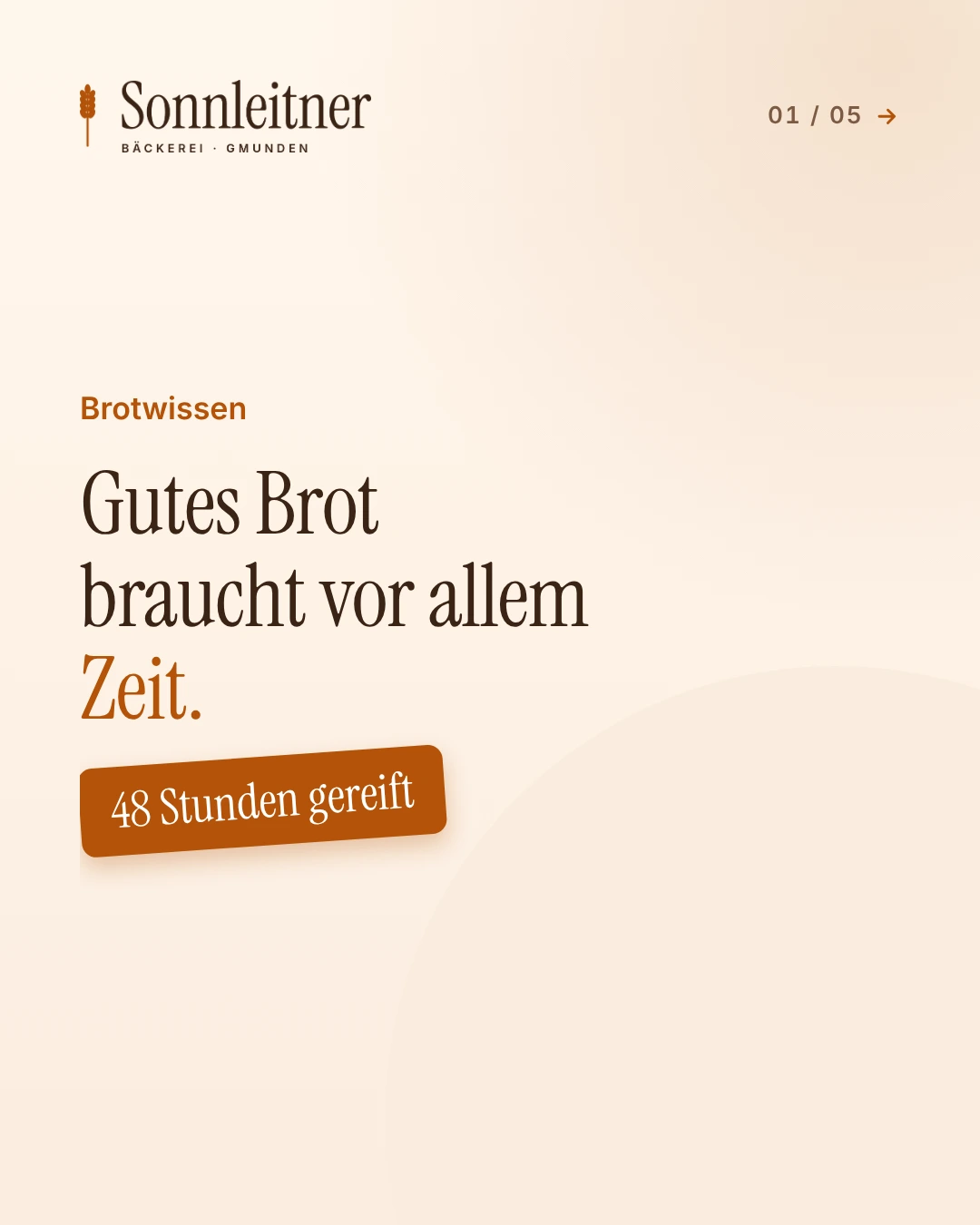
Set in the client's lookThe first slide of a demo bakery's carousel, set by its brand template.
Creative Kit
Demo workspace
Creative Kit

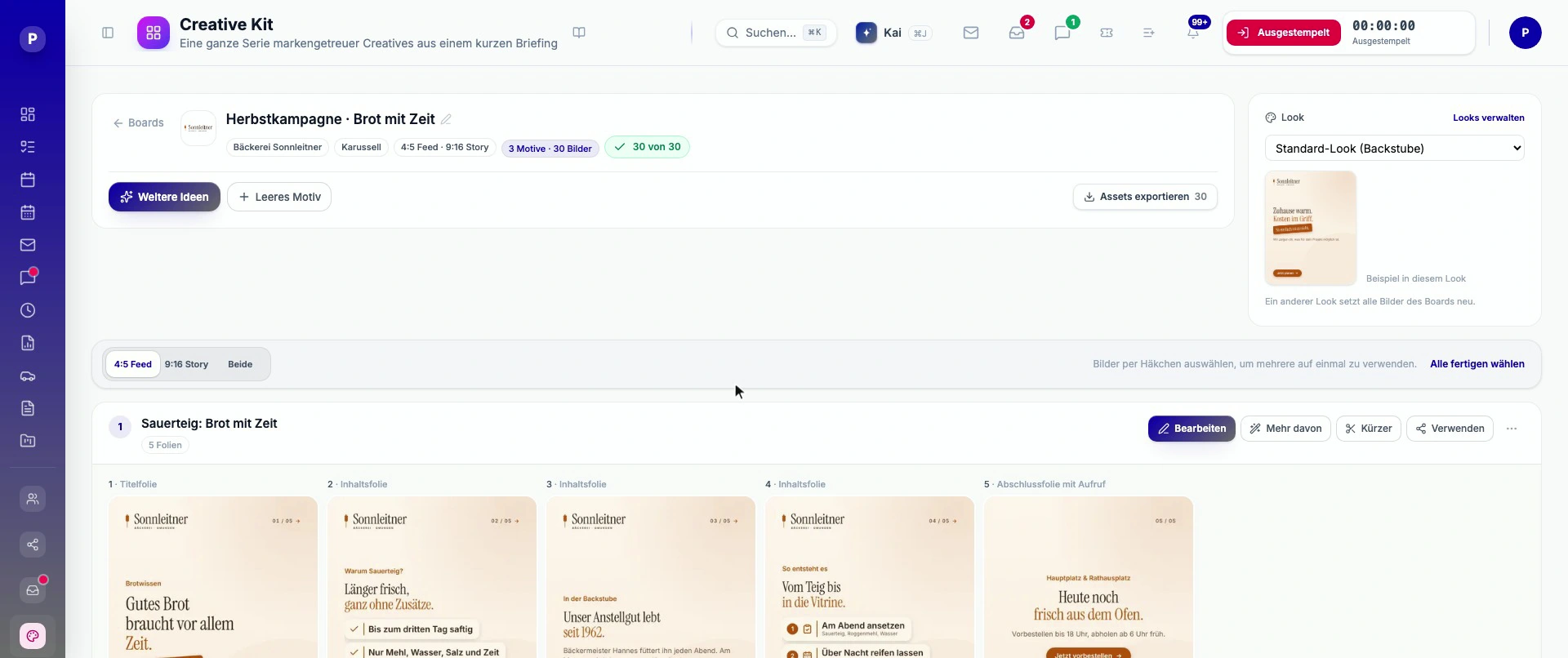
One board, three motifs, 30 pictures in the bakery's look. Edit, more like this, shorter, or use it straight away.

Video Studio & Image Lab

A full AI studio, already inside.

Gemini Omni makes AI clips by default, with Veo, Kling and Seedance alongside when a shot needs them. Storyboards start from a script, story films get voice-over, word-by-word captions and music in the client's look, and an existing cut can be dubbed into another language or captioned. Images come from references and brand kits. You see the cost before anything renders.

Quick clip·Storyboard·Animate a still·Story film·Dub or caption a cut·Refine with AI
PPY Workspace
Image Lab

References, image variations and the finished visual in one workspace.

Production · optional module

Strategy, shoot, Drehplan, cut. In one place.

Strategy→Shoot dates→Drehplan→Client approval→Cut

Bring in the client's content strategy and plan the shoots from it. Per shoot, the AI writes ideas, hooks, scripts and the shot list; the dates come from your rules, never from the AI. The client approves the Drehplan in the portal, and after the shoot the Studio analyses the footage, picks the best takes and cuts a first edit.

Included in Enterprise. On Professional €147 / month for all three parts. Switched on per agency, because the footage analysis and the films use AI credits.

  • Drehplan as a document. Script, shot list, run of show and props, with versions and a PDF for the crew or the client.
  • Crew and post-production planned. Half days, clock times and an ICS feed for everyone on the shoot.
  • From footage to a first cut. Raw clips from upload, Google Drive, Dropbox or OneDrive are transcribed, the takes chosen and cut.
  • The feature film. A 35 to 55 second product film from a film script, checked by a reviewer before it is used.
Shoot planning
Demo workspace
Shoot planning

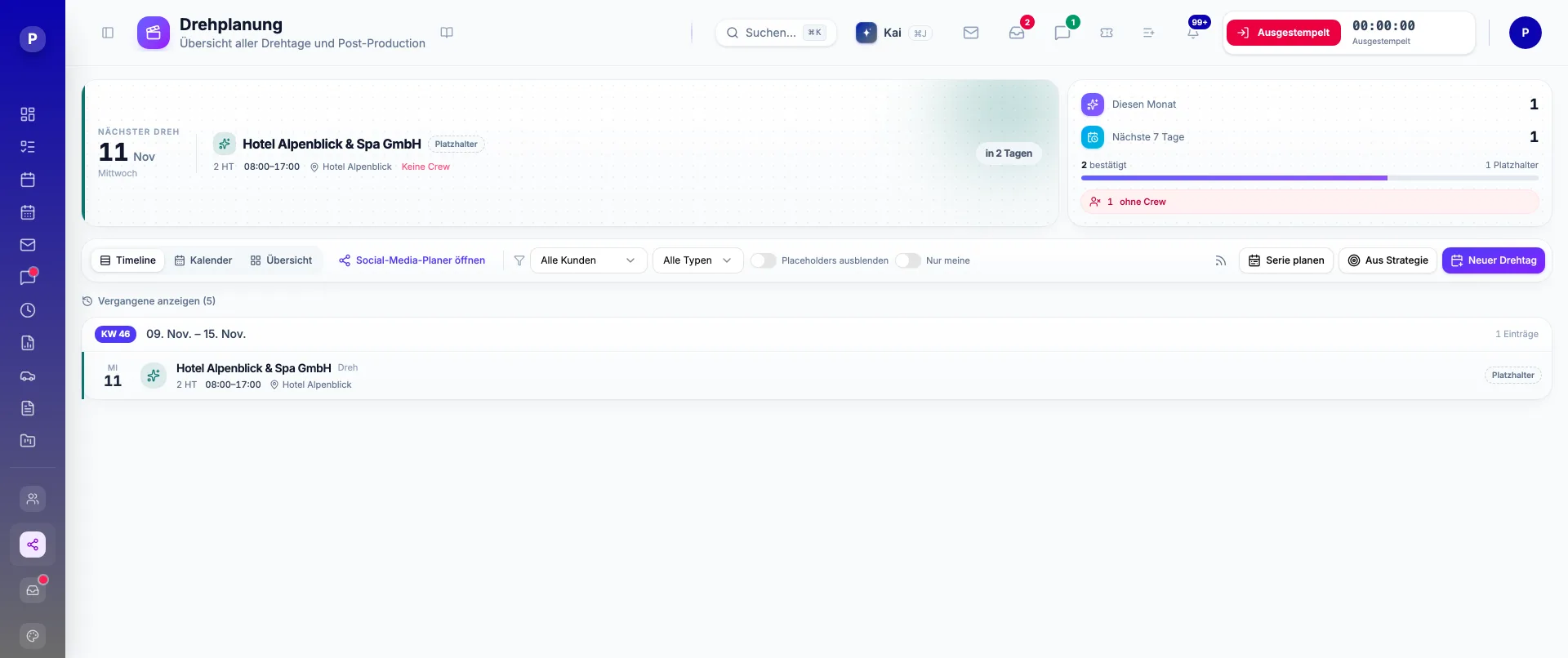
Shoot days, crew and post-production at a glance. Shoots can be planned straight from the client's content strategy.

Reporting

Social, YouTube, website, ads. One report per client.

Each client connects their own accounts once. Their numbers then land in the analytics, the AI briefing, the PDF report and, if you want, in their portal.

YouTube, published and measured

Upload as public, unlisted or private, now or at a planned time, from the same board as every other post. Views, watch time and subscribers come back into the report.

Google Ads, read-only

Campaigns and their results next to Meta in the Ads Hub. The HUB reads them; it never changes a budget or spends anything.

GA4 for websites and apps

Website reports per client, with an optional view for iOS and Android apps, read with viewer rights only.

Your clients see their own numbers

In the portal and as a branded PDF. A client only ever sees their own data.

Growth engines

Win clients with tools their other agencies don't have.

Ad Watcher checks your clients' competitors in the Meta Ad Library every day and reviews each new ad with AI. AEO shows how AI search describes your clients, and lead generation finds the next ones.

  • New ads, checked daily. One check per competitor per day, with a notification when something new turns up.
  • An AI review of every creative. Hook, audience, strengths and a score from 1 to 10, for images and video.
  • A brief per competitor. The last 14 days in a few lines, ready for your next pitch or campaign.
Demo workspace
Ad Watcher

Competitors’ new ads, reviewed by AI: hook, audience, strengths and a score from 1 to 10.

Run the business

CRM to timesheet. No copy-paste between tools.

Clients and leads. Briefs, brand kits, budgets and portal access in one record.

Conversations with context

Email, social enquiries and internal notes in the Communications Hub. Your team sees the conversation and its client context.

WhatsApp that keeps going

Opt-ins, templates approved by Meta, broadcasts with a cost estimate and a budget stop, and flows with conditions, waits and replies. Answers land in the inbox.

Time & attendance

Check in when the day starts, start a timer on the card you work on, and the client is booked with it. Flexitime, approvals and reports by card, task and client.

PPY Workspace
Communications Hub

The conversation and its client context side by side. Replies and internal notes in one place.

Kai & your own assistant

Ask the HUB. Or let Claude work in it.

Kai, inside the HUB

Press ⌘J and ask. Kai explains features, finds the right guide, reads what you are allowed to see, summarises inbox threads and, once an admin allows it, drafts tasks, time entries and social posts. Nothing is saved until you confirm. Kai runs on your AI credits.

Your assistant, connected

Connect Claude or another MCP client to your HUB with your normal login, read-only or with write access. It works with your permissions, drafts posts, tasks and time entries, and never schedules, publishes or sends.

Finance

From timesheet to invoice. Without a second tool.

Approved hours, retainers and milestones become invoices. Incoming bills are read by AI, the bank feed shows what was paid, and at month-end your accountant gets a BMD or DATEV export.

Included in Enterprise. On other plans €29 / month. One company, in euro. It prepares the books for your accountant rather than replacing them.

  • E-invoices built in. XRechnung, ZUGFeRD and ebInterface next to your branded PDF.
  • Receipts read by AI. Upload a PDF, forward an email or take a photo. Supplier, amounts and VAT are suggested for you to check.
  • Paid and matched. Bank movements and card payments are matched to the invoices they settle.
  • A clean month-end. Review the month, close it, and hand your accountant one export.
Demo workspace
Finance

Open invoices, incoming bills and the bank at a glance, through to the accountant handoff.

Client experience

Your clients get their own branded portal.

On your domain, under your name, themed in each client's own colours. Reels arrive watermarked; two taps and they are approved.

Contracting & e-signature, no DocuSign detourDrehplan approvalAds analytics & Meta Ad Library

The approval

Watermarked preview. Request changes or approve from the phone. Contracts can even be signed without an account at all.

The queue

Clients always know what needs their eyes. You always know what is waiting on whom.

PPY Workspace
Review posts

The client’s view: inspect platform previews, give feedback and approve posts.

Consolidation

What the HUB replaces.

Select the tools you pay for today and set your team size. These example amounts are a starting point; your actual costs may differ.

In the Agency HUBYour current toolsper month
Your comparison
Selected tools€1,578
Agency HUB €499
Add-on modulesAI lead generation · AEO analysis+€198
Saved on subscriptions€881
Time saved~17 h less manual work · ~28 h from one tool instead of 7~45 h
€2,250
Your advantage€3,131/ month
Per person, per month
Agency HUB€70
Your tools€158
Time saved~4.5 h
Illustrative comparison for a team of 10 people, not a price guarantee. Tools billed per user grow with the team. The time figures are deliberately low: Harvard Business Review found switching between apps costs each person almost four hours a week — we count 24 minutes per person per replaced tool per month. AI usage may cost extra.
Start your 14-day trial
Pricing

Your pack. Extras as you grow.

Starter

€199/ month
Billed monthly
  • 5 team members · 5 GB storage
  • 9 of 21 modules
  • Unlimited client-portal logins
  • Connect your own storage: Google Drive, Dropbox, OneDrive
  • 1,000 AI credits / month
  • 14 days free trial
Start 14-day trial
MOST POPULAR

Professional

€499/ month
Billed monthly
  • 10 team members · 25 GB storage
  • 16 of 21 modules
  • Unlimited client-portal logins
  • Creative Kit & brand looks
  • Kai, your AI assistant
  • Video Studio
  • Connect your own storage: Google Drive, Dropbox, OneDrive
  • 5,000 AI credits / month
  • 14 days free trial
Start 14-day trial

Enterprise

€999/ month
Billed monthly
  • 20 team members · 100 GB storage
  • 21 of 21 modules
  • Unlimited client-portal logins
  • Creative Kit & brand looks
  • Kai, your AI assistant
  • Video Studio
  • Production
  • Connect your own storage: Google Drive, Dropbox, OneDrive
  • 15,000 AI credits / month
Get started
Single modules bookable from €19 / month14-day free trial, card required, cancel any timeUpgrade self-serve, live within minutesAustrian invoices, reverse charge for EU businesses, no marketplace middleman
Your plan, at a glance.

Modules · Users · AI credits

Keep track of your plan and usage. Add what you need as your agency grows.

Pricing
Inside the product

Plans, upgrades and billing, live in the product.

  • Customers see their plan, limits and modules, and upgrade themselves.
  • Monthly invoicing runs automatically, VAT handled, receipts in your inbox.
  • AI credit top-ups by card, in minutes.
Fair AI pricing

AI credits. Pay for what you generate.

Your pack includes a monthly AI allowance. One credit equals €0.01. See the estimated cost before generating. Top up when needed, or use your own API keys and pay your provider directly.

What a credit buys

6 – 9One AI image≈ €0.06 – €0.09
12010 seconds of AI video with Gemini Omni (default)≈ €1.20
4808 seconds of AI video with Veo 3.1≈ €4.80
18Voice-over for a 50-second film≈ €0.18
1One minute of transcription≈ €0.01

Default rates of the platform keys. Model, format and length decide the cost, and the HUB shows the estimate before every generation. With your own API keys nothing is metered in credits.

Monthly allowance includedLow-credit warningCard top-ups never expire
Questions

The things agencies ask before they sign up.

Where does my data live?

Your application and database run on servers in Austria, in a database that belongs to your instance alone. No shared tables with other agencies. AI generation runs on specialist providers, some of them outside the EU — they are named individually in our sub-processor list. You get a signed data-processing agreement (AVV) with your subscription, and a full export on request.

Can I use my own domain?

Yes. You start on yourname.agency-hub.eu within minutes of approval. Add a custom domain such as hub.youragency.com later from the settings page: one CNAME on your side, certificates and routing are handled for you.

What happens after I sign up?

You add a card at checkout, which is authorised but not charged, and your instance is built automatically within minutes. You receive an invitation to set your password, and the 14-day trial starts when your HUB goes live. Cancel before it ends and nothing is charged.

What happens after the 14-day trial?

Your card is charged for the pack you chose, unless you cancel before the trial ends. You can cancel in one click from the billing portal. Everything you built during the trial stays. Cancelling later stops the next renewal; your instance stays readable for 30 days and is then deleted.

Do my clients see your name when they connect Facebook?

Only if you want them to. Out of the box, publishing runs through our reviewed Meta app, so your clients read our app name in the Facebook consent dialog — the same arrangement Buffer, Later and Hootsuite use. If you would rather they read yours, bring your own Meta app: paste its App ID and secret during setup and every consent dialog, Page connection and published post carries your agency's name instead. Worth deciding before you connect the first account, because Messenger and Instagram conversations are tied to the app that received them.

Do client-portal logins count as users?

No. The users in your pack are your own team. Clients who log into their portal to approve posts, sign contracts or look at their numbers are free and unlimited.

Can we use our own AI keys, and what happens to the data?

Yes. Add a provider key under Admin → Integrations and that provider runs on your own account: the provider bills you directly and nothing is metered in credits. Without your own key, generation runs on our platform keys and uses credits. Either way, connection credentials are stored encrypted, your agency has its own database, and the AI providers that process generation requests are named in our sub-processor list.

How do my clients connect YouTube and Google?

Per client, in the HUB: YouTube and Google Ads through Google's normal sign-in, GA4 by giving the HUB viewer access to the property. Google Ads and GA4 are read-only — the HUB reads reports and never changes a campaign or spends money. Every connection can be removed again at any time.

Can I connect Claude or another assistant?

Yes. Every HUB has its own MCP address. Add it as a custom connector in Claude or another MCP client, sign in with your normal HUB login and choose read-only or full access. The assistant then works with your permissions: it reads, drafts posts, tasks and time entries and edits draft cards, but it never schedules, publishes or sends, and admin and security settings stay out of reach. Kai, the assistant built into the HUB, is the other way in.

Can I switch packs or book single modules?

Upgrades apply within minutes; the running period finishes at your current price and the new one starts with the next. Single modules can be added to any pack from €19 per month, or ask us and we book them for you.

Who is behind Agency HUB?

PPY Solutions, a software and AI-automation studio in Pfaffstätt, Upper Austria. Agency HUB runs in production at Tricky Media and is continuously developed.

Why PPY

One partner. One platform. Your agency.

Your own instance

Isolated per customer: own database, own domain, your branding on every pixel including the client portal.

Austrian hosting & GDPR

App and database in Austria, AI providers named in the sub-processor list. Austrian invoices with proper USt, reverse charge for EU business customers.

Continuous updates

One partner, continuous updates. New AI models land for every customer at once, and a short note in your HUB says what changed each week.